Every PC cheat guide begins with "open the console", and that is the step people get stuck on. The key is different from game to game. Some games will not open the console at all until you change a setting before launch. We went through the console instructions on every cheat page on this site. The same handful of patterns covers almost all of them.

1. The key under Esc
The most common console key by far is the one to the left of 1 and under Esc. It is called the grave or backtick key and shows `, and on many keyboards also ~ or ¬. Bethesda's games use it, and so do many others, such as Derail Valley and Rage.
Some cheat guides say `, some say ~, and some say "tilde". In most cases they all mean this same key. Heretic II and Kingdom Come: Deliverance say ~, and you press the same key.
If the key does nothing: on some non-US keyboard layouts that key types something else, and the game never sees the key it expects. A common fix is to switch Windows to an English (US) keyboard layout while you play.
2. Ctrl + Shift + C: The Sims and Spore
EA and Maxis use their own shortcut. In The Sims 2, The Sims 3 and Spore, press Ctrl + Shift + C together and a box appears at the top of the screen. Every other cheat is typed into that box. It is the second most common pattern on our pages, because every Sims expansion pack has its own page and uses the same shortcut.
3. Three-key and two-key shortcuts
Some games add a modifier key, so you cannot open the console by accident:
- Ctrl + Alt + ~: Quake 4 and Prey (2006).
- Shift + `: Jedi Knight II: Jedi Outcast. In that game you also have to type
helpusobi 1before any other cheat command works. - Alt + F2: Supreme Commander, once cheats are switched on for the game.
4. A different key altogether
- Tab: ARK: Survival Evolved. In single player, commands start with
cheat, for examplecheat god. On a server you need admin access first. - F1: 7 Days to Die.
- Enter: Starbound. It has no separate console. Commands go into the chat box.
5. Games that need a setting first
Subnautica has its console switched off by default, and you turn it on inside the game. Press F3, untick "Disable Console", press F8 to free the mouse, and then the ~ key opens the console.
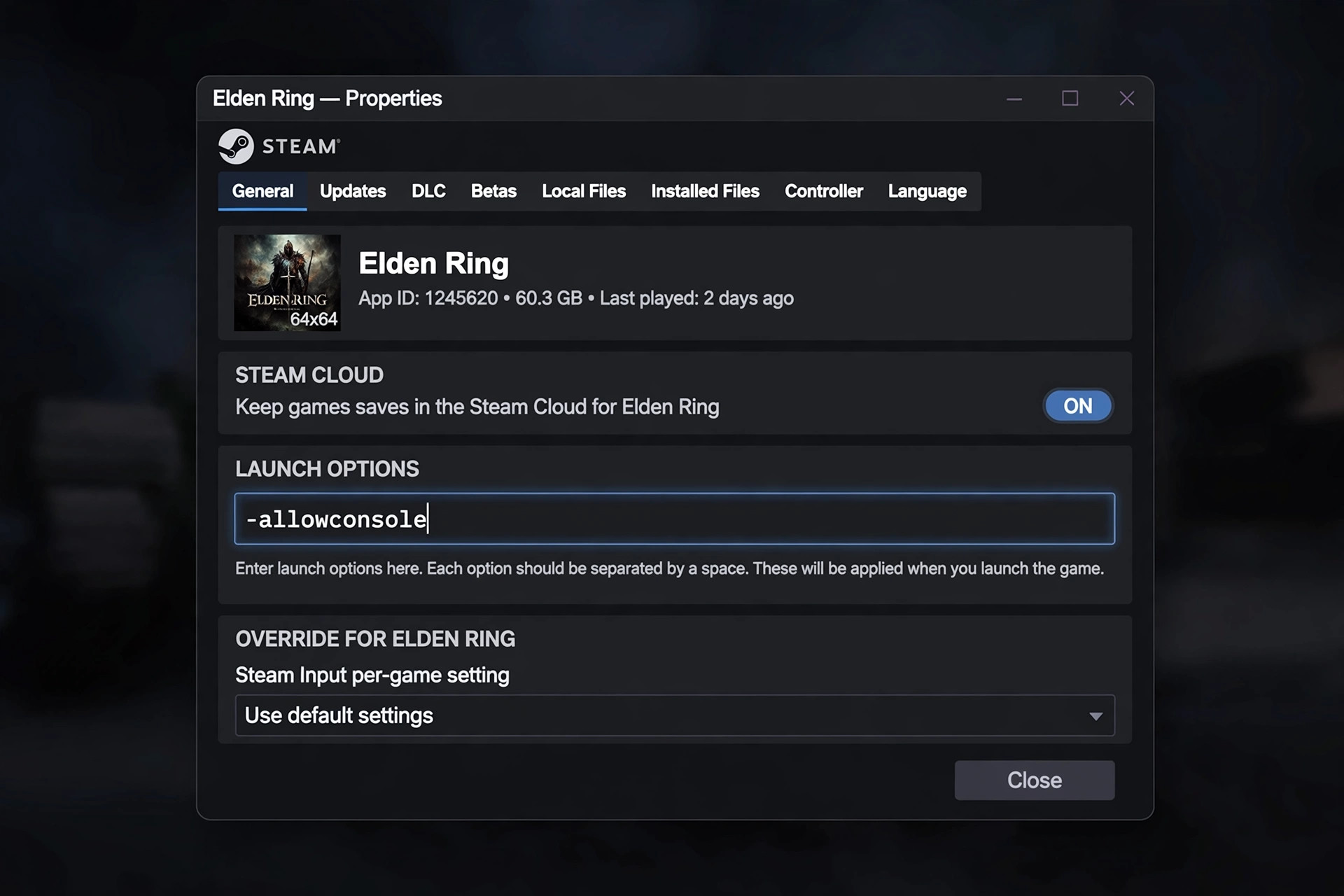
6. Games that need a launch option
Some games hide the console unless you start them with an extra setting. On Steam, right-click the game in your library, choose Properties, and type the setting into the Launch Options box. For a game started from a desktop shortcut, right-click the shortcut, choose Properties, and add the setting after the closing quote of the path in Target.
| Game | Launch option | Then open with |
|---|---|---|
| XCOM 2 | -allowconsole | ` |
| Rage | +set com_allowconsole 1 | ` |
| Prey (2006) | +set com_allowConsole 1 | One key instead of Ctrl + Alt + ~ |
| No One Lives Forever | +setconsole 1 | The game's console key |
| Kingdom Come: Deliverance | -devmode | ~ (some commands work without it) |
Type the launch option exactly as shown, including the dash or plus sign at the start. These options belong to the game, so an option that works in one game does nothing in another. -allowconsole is for XCOM 2. It will not open Rage's console.
Will it switch off achievements?
That depends on the game, so check the game's own page. A few examples from our pages:
- In XCOM 2, using the console turns off achievements for that campaign.
- In Subnautica, it turns them off for that save.
- In Skyrim, running any command blocks Steam achievements until you restart the game.
- Kingdom Come: Deliverance is the opposite. Its wiki says console commands do not turn off achievements.
If you care about achievements, keep a copy of your save before you try any command. Our save file guide shows where to find it.
The console is open, now what?
Type the command and press Enter. Commands are usually not case-sensitive, but spaces and numbers have to be exact. If a command does nothing, the cause is usually one of three things. Cheats may need switching on first, as in Jedi Outcast. You may be in multiplayer, where single-player commands are blocked. Or the command may be from a different version of the game. The cheats page for each game lists the commands we hold for it, each with a note on how to enter it.